
LiveSpace 3D · 2020 Flex

Your client's kitchen, in their hands.

A real interactive walkthrough generated from every 2020 Flex (2020 Design) kitchen we deliver. Drag the model below to explore it, then send your client the same link.

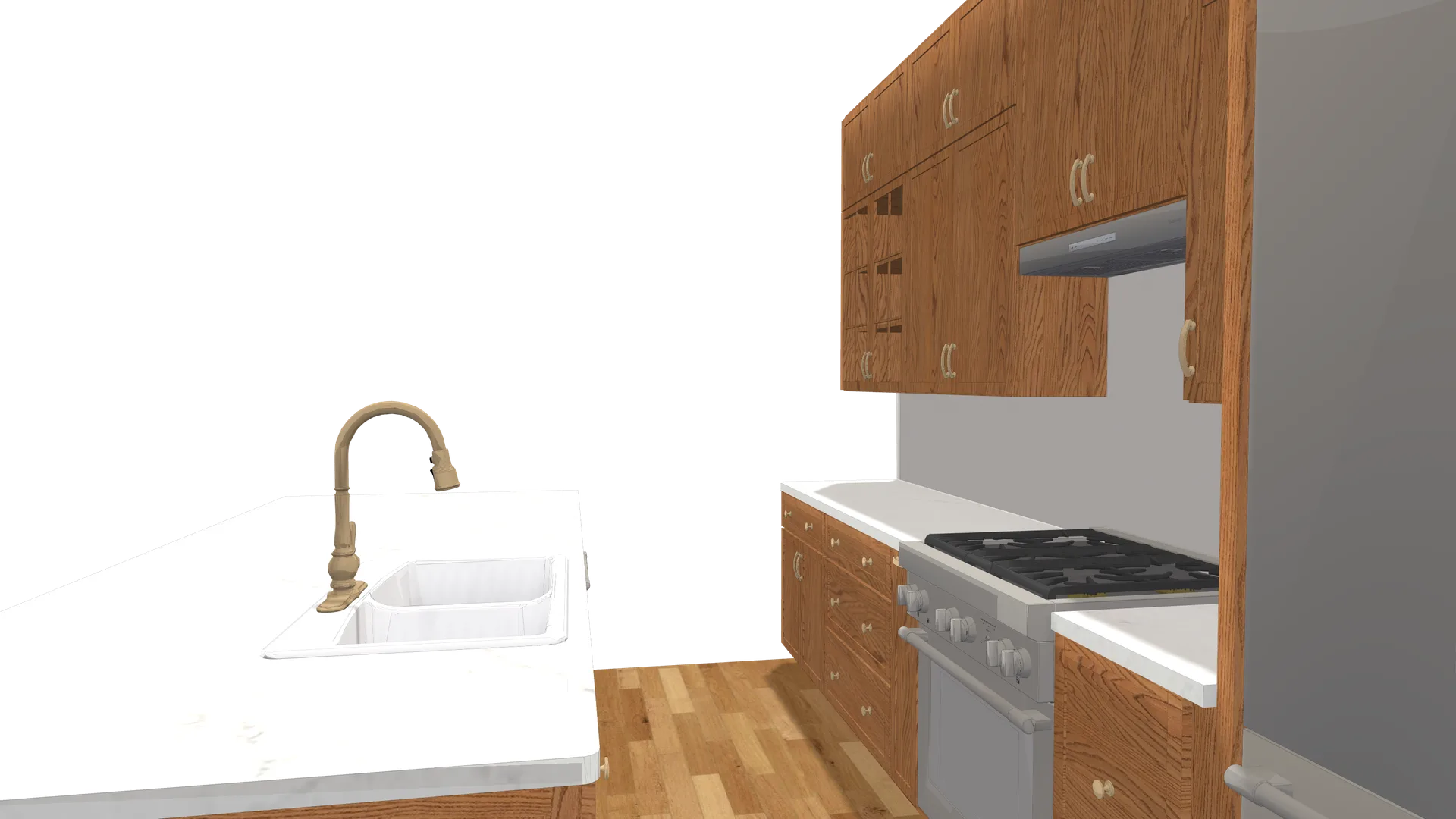
Live 3D LiveSpace walkthrough of a 2020 Flex kitchen with island, gas range, brass faucet and herringbone floor Live 3D · auto-rotating Drag to orbit · scroll to zoom
  • Full 360° orbit

    Spin the kitchen from any angle, like standing in the room.

  • One shareable link

    Text or email a single link. Nothing to download or install.

  • Any device

    Touch-optimized for phone, tablet, and desktop. No app.

  • Included free

    With every flat $100 design, delivered by 9 AM.

Why it converts

Clients stay longer when they can walk it.

  • 4.2min

    Average client view time

  • 73%

    Longer engagement vs flat renders

  • 3x

    More client interactions

  • 0

    Apps or downloads to view

Engagement figures from FKD LiveSpace 3D usage vs static renders.

Live examples

Walk a few real 2020 Flex designs.

These are actual LiveSpace 3D walkthroughs exported from 2020 Flex (2020 Design) projects, the same interactive link your client receives. Tap any design to open it full screen, then drag to orbit and scroll to zoom. No app, no download.

How It Works

From floor plan to finished design, overnight.

  1. 01

    Evening

    You submit

    Anything goes. We sort the format.

  2. 02

    Overnight

    We design

    30+ designers in 2020 Flex, every night.

  3. 03

    Morning

    You wake up

    Files in your inbox before 9 AM.

  4. 04

    Same-day

    We iterate

    Revisions back the same day.

30+ designers · Hundreds of drawings · Every business day, on this exact cycle.

What Our Clients Say

Trusted by 200+ kitchen businesses.

"We tried two other outsource services before FKD. Neither matched the turnaround or quality. Exclusively FKD for 18 months now."
MC

Mike Chen

Sales Manager · Pacific Kitchen Supply · Portland, OR

"The white-label option was the game changer. Our clients see our brand on every design. They don't know FKD exists. Exactly how it should be."
JW

Jennifer Walsh

Principal Designer · Walsh & Associates · Boston, MA

LiveSpace 3D questions

Common questions about LiveSpace 3D walkthroughs.

  • What is LiveSpace 3D?

    LiveSpace 3D is an interactive walkthrough generated from your 2020 Flex (2020 Design) kitchen. Instead of a flat image, your client opens a link and orbits the room in full 3D on any device, with no app or download.

  • Is LiveSpace 3D included or extra?

    It is included free with every flat $100 2020 Flex design. Each design we deliver comes with photoreal renders, dimensioned elevations, floor plans, the .kit file, and a LiveSpace 3D walkthrough link.

  • Does my client need to install anything?

    No. LiveSpace 3D opens in any modern browser from a single shareable link. There are zero apps, logins, or downloads for your client.

  • How do clients use the link?

    You send the LiveSpace link by text or email, or open it on a showroom screen. Clients can rotate, orbit, and explore their 2020 Flex kitchen design themselves, which keeps them engaged far longer than a static render.

  • What is a LiveSpace 3D walkthrough?

    LiveSpace 3D is an interactive, web-based walkthrough of your finished kitchen or bath design. You open a link in any browser and move through the room in three dimensions, viewing cabinets, finishes, and layout from every angle. Every design Fast Kitchen Design produces in 2020 Flex includes a LiveSpace 3D link alongside the renders and floor plans.

  • How do I view a 3D kitchen walkthrough?

    You view it by clicking the LiveSpace 3D link included with your design. It opens in a standard web browser on desktop, tablet, or phone, with no software to install and no license required. You and your client can explore the kitchen layout, orbit around islands, and see finishes in context before anything is ordered or built.

  • Is a 3D kitchen viewer the same as a render?

    They serve different purposes. A render is a fixed photoreal image of one view, while a 3D viewer lets you move freely through the whole room. Each Fast Kitchen Design package includes both: photoreal 3D renders for marketing and approvals, plus the interactive LiveSpace walkthrough for exploring the full space.

  • Do clients need software to open the walkthrough?

    No. The walkthrough opens in any web browser through a shareable link, so your client never installs an app or buys a license. This makes it easy to forward the link by email, review the design together on a call, or pull it up on a showroom screen during a sales conversation.

Get started

Start your kitchen design in 2020 Flex with Fast Kitchen Design

Tell us about your space. We'll send your custom 2020 Flex design, usually delivered by 9 AM the next morning.

$100 flat. Any size. Any room.

  • Photorealistic 3D renders
  • LiveSpace 3D walkthrough link
  • Native 2020 Flex (.kit) file
  • Floorplans and elevations
  • Unlimited revisions